


Here are a few features in this version:
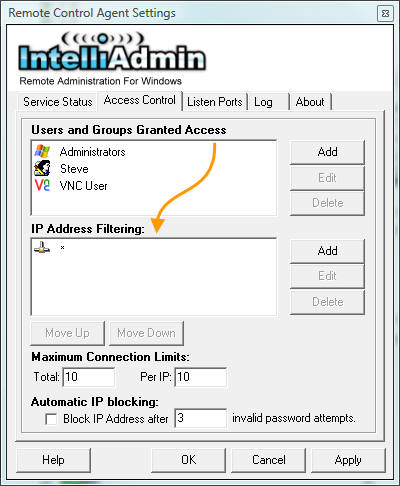
IP Address Filtering - You only want specific ranges of IP addresses connecting to a machine? It is easy with our IP address filtering. Add multiple rules to fill your needs:
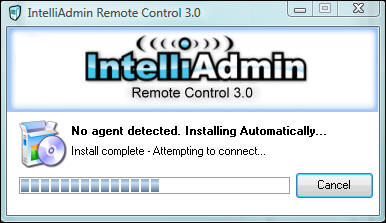
Never Install an Agent - Our Remote Control Client can install and agent for you. If you can connect to the machine on your LAN, Remote Control 3.0 will automatically install the agent and give Windows Administrators access by default:
Windows User Accounts - Limiting remote administration access to computers is an important aspect to your IT policy. Remote Control allows you to use Active Directory security groups, or single user names to grant access to a machine. Remote Control provides a fine level of control. For any group, or username you can force specific features:
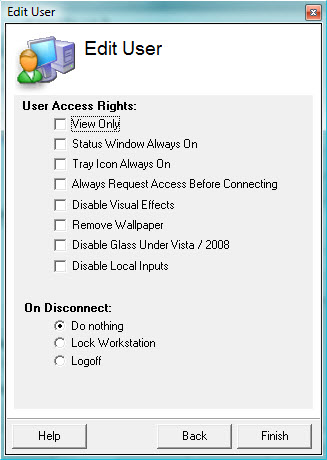
This can be especially helpful in environments that require strict regulatory compliance. For example, you could require that all of your IT administrators request access before connecting, and always show a status window. That way the end user always knows when an administrator is working on their machine.
256 Bit AES Encryption - Connections are now secured with 256 bit AES encryption. This keeps your credentials and data safe. This is the same encryption authorized for use by the United States federal government
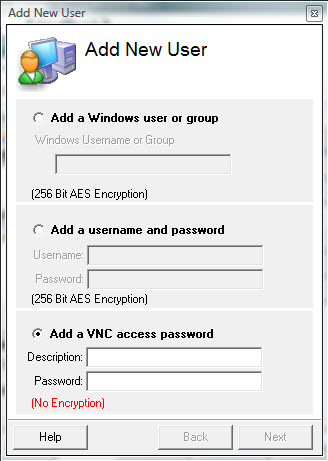
VNC Support - VNC has become a ubiquitous remote control solution, and we understand that. Our server natively supports VNC. It offers an unprecedented level of control. You can create multiple levels of access based on the password provided. Just remember when using VNC you don't have the luxury of our 256 Bit AES encryption - but hey, if you need it, the option is there. Unlike most VNC supporting servers, we have not used the RealVNC open source code base to create our server. It has been written from scratch to best service the needs of IT administrators.
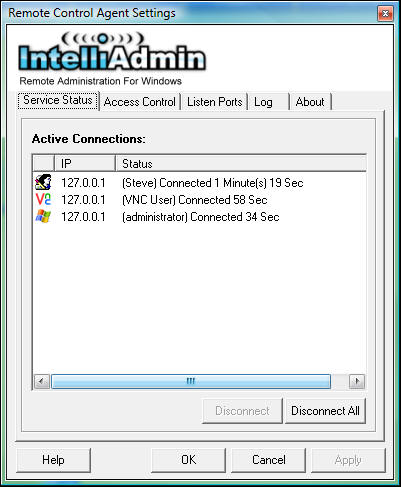
Visual Status Indicator - With some remote control solutions, it can be difficult to see who is connected. It is easy to see who, and how long a user has been connected in Remote Control 3. Just take a peek at the agent settings window and you can see right away:
That's all I have for now, take it for a spin and download our 15 day trial:

Posted By: Steve Wiseman on Friday, November 14, 2008
Check out our utilities for windows